
System Architecture Overview
Understand how Matimo’s monorepo structure works and how components interact.
High-Level Runtime Architecture
Section titled “High-Level Runtime Architecture”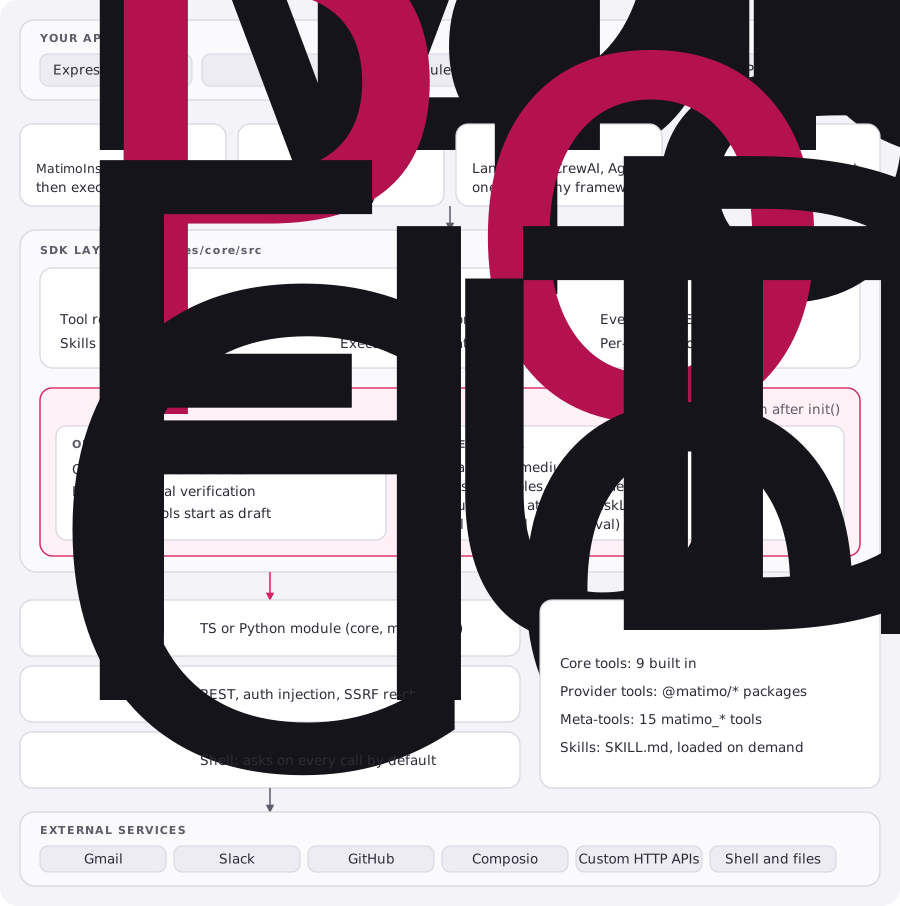
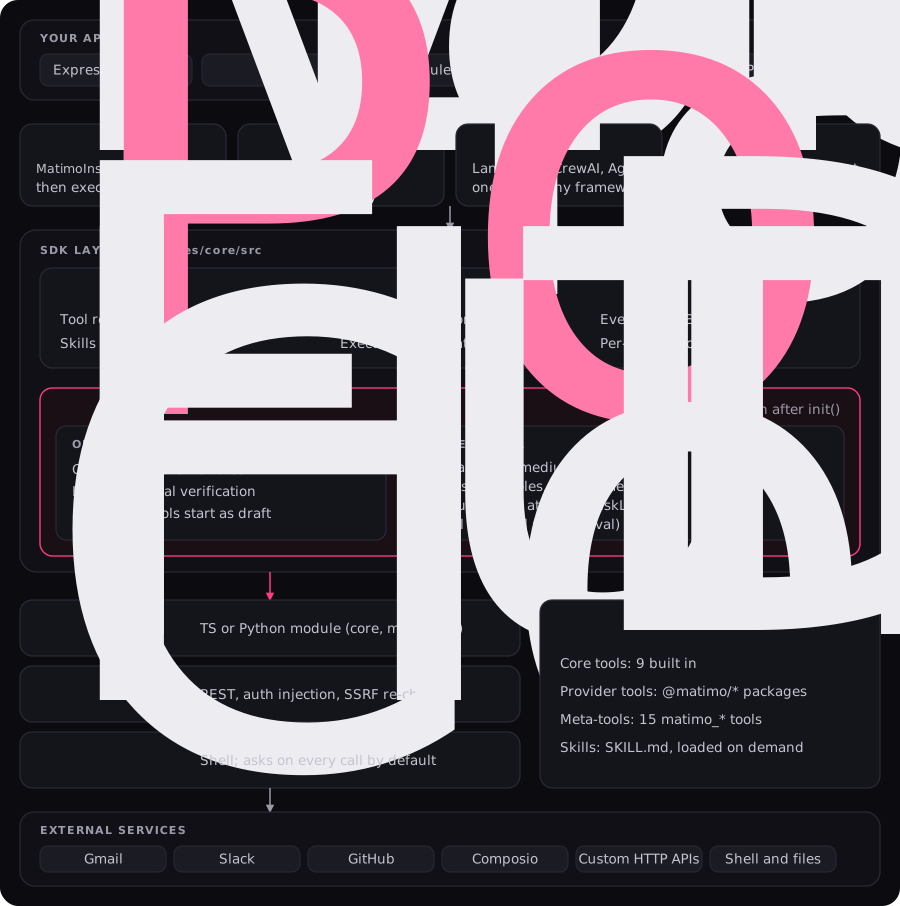
Read it top to bottom. Your code reaches Matimo through one of four entry points, and every one lands in the same MatimoInstance. Nothing reaches an executor without passing the policy gate: untrusted tools are validated when they load, and every call is risk-classified, gated, and approved by a human where required. Tool and skill definitions are loaded into the orchestrator at init and on reload.
Monorepo Organization
Section titled “Monorepo Organization”The repository holds two SDKs that share one tool format. typescript/ is a pnpm workspace and python/ a uv workspace; every package has a Python counterpart except @matimo/composio, which is TypeScript-only.
typescript/packages/core          # Core SDK (@matimo/core on npm)   ↔ python/packages/core (matimo-core)├── src/                          # Orchestration, executors, policy, approval, MCP server, integrations├── tools/                        # 9 built-in tools + 15 matimo_* meta-tools│   ├── calculator, web, web_scraper, convert_to_file, extract_from_file, execute, read, edit, search│   ├── matimo_validate_tool / matimo_create_tool / matimo_approve_tool│   ├── matimo_reload_tools / matimo_list_user_tools / matimo_get_tool_status│   ├── matimo_get_tool / matimo_search_tools│   ├── matimo_create_skill / matimo_list_skills / matimo_get_skill / matimo_validate_skill│   └── matimo_search_skills / matimo_get_skill_sections / matimo_get_skill_content└── skills/                       # 6 core SKILL.md files    ├── tool-creation/  meta-tools-lifecycle/  policy-validation/    └── tool-discovery/  skill-creator/  skills-catalog/
typescript/packages/<provider>    # @matimo/slack, gmail, github, hubspot, notion, postgres,├── tools/<tool>/definition.yaml  #   twilio, mailchimp, microsoft, bruno, composio├── skills/<provider>/SKILL.md└── definition.yaml               # OAuth2 provider config, where the provider uses OAuth2
typescript/packages/cli           # matimo CLI (@matimo/cli): install, list, search, doctor, review, mcp
typescript/examples/tools/        # Per-provider examples (factory, decorator, LangChain, with-approval),                                  # plus policy/, skills/, meta-flow/ and agents/python/examples/                  # native/, langchain/, crewai/, mcp/
The Python side mirrors the TypeScript layout. Replace typescript/packages/core/src with python/packages/core/src/matimo (a package per concern: instance.py, core/, executors/, policy/, approval/, auth/, mcp/, integrations/, tools/):
python/packages/core # matimo-core on PyPIpython/packages/matimo # "matimo" meta-package: pulls in matimo-core and matimo-clipython/packages/cli # matimo-clipython/packages/<provider> # matimo-slack, matimo-gmail, matimo-github, ... (no composio)Key principle: Each package installs on its own from npm or PyPI. A tool’s YAML is the single source of truth for both SDKs.
Component Layers
Section titled “Component Layers”1. Application Layer
Section titled “1. Application Layer”Your code that uses Matimo. Examples:
- Express.js API endpoint
- LangChain agent
- CLI tool
- Scheduled job
- Discord bot
2. SDK Layer (packages/core)
Section titled “2. SDK Layer (packages/core)”Factory Pattern:
import { MatimoInstance } from 'matimo';
const m = await MatimoInstance.init({ autoDiscover: true });const result = await m.execute('calculator', params);
Decorator Pattern:
import { tool } from 'matimo';
class Agent { @tool('calculator') async calculate(...) { }}Python:
from matimo import Matimo, tool
# Factory patternm = await Matimo.init(auto_discover=True)result = await m.execute("calculator", {"operation": "add", "a": 5, "b": 3})
# Decorator patternclass Agent:    def __init__(self, matimo: Matimo) -> None:        self._matimo = matimo
    @tool("calculator")    async def calculate(self, operation: str, a: float, b: float): ...
3. Core Orchestration (packages/core/src)
Section titled “3. Core Orchestration (packages/core/src)”MatimoInstance: Central orchestrator that:
- Initializes tool loading
- Manages auto-discovery
- Runs every call through the policy gate, HITL quarantine and per-call approval
- Coordinates execution
- Handles errors
- Injects credentials (environment variables or per-call
credentials) - Emits events to
onEventand theauditSink - Runs
matimo_reload_toolson itself, since a reload rebuilds its registry
It does not validate parameters against the YAML before running a tool; the tool or the API it calls reports bad input.
4. Tool Management (packages/core/src/core)
Section titled “4. Tool Management (packages/core/src/core)”ToolLoader (internal): Loads tools from YAML files
- Reads from
packages/{provider}/tools/*/definition.yaml - Validates against Zod schema
- Returns
ToolDefinition[] - Auto-discovers packages from
node_modules/@matimo/*/tools
ToolRegistry (internal): In-memory index of all tools
tools: Map<name, ToolDefinition>|├── calculator (from packages/core/tools/)├── slack-send-message (from packages/slack/tools/)├── slack-list-channels (from packages/slack/tools/)├── gmail-send-email (from packages/gmail/tools/)├── matimo_validate_tool (built-in meta-tool)├── matimo_create_tool (built-in meta-tool)├── matimo_approve_tool (built-in meta-tool)└── ...5. Execution Layer (packages/core/src/executors)
Section titled “5. Execution Layer (packages/core/src/executors)”FunctionExecutor (Primary for Core Tools): Executes JavaScript/TypeScript functions directly
Input: { code: "execute.ts", params: {...} }Process: Import and call function directly (no subprocess)Output: { result }Used by all 9 core tools: execute, read, edit, search, web, calculator, web_scraper, convert_to_file, extract_from_file
HttpExecutor: Makes HTTP requests with automatic validation
Input: { method: "POST", url: "...", headers: {...}, body: {...} }Process: Embed params, re-check the final URL for SSRF targets, send the requestOutput: { success, data, statusCode, headers } (Python returns the parsed body)Both language implementations enforce a coarse 50 MB upstream size ceiling on the raw response as defense in depth, independent of the response-size guardrail applied later in execute() (see Tool Execution Flow): TypeScript sets axios’s maxContentLength/maxBodyLength; Python streams the response manually via httpx’s client.stream() and aborts once the declared Content-Length or the accumulated body exceeds the cap, since httpx has no direct equivalent option.
CommandExecutor (Shell Execution): Runs external shell commands. No built-in tool uses it; a type: command tool asks for approval on every call unless it declares requires_approval: false
Input: { command: "node script.js", args: [...] }Process: Spawn child processOutput: { stdout, stderr, exitCode }Used for external tools and legacy scripts that need subprocess execution.
6. Tool Definitions (YAML)
Section titled “6. Tool Definitions (YAML)”Core Tools (packages/core/tools/):
name: calculatorexecution: type: function code: './calculator.ts'Provider Tools (packages/{provider}/tools/):
name: slack-send-messageexecution: type: http method: POST url: https://slack.com/api/chat.postMessageProvider Config (packages/{provider}/definition.yaml):
type: providername: slackprovider: endpoints: authorizationUrl: https://slack.com/oauth_authorize7. External Services
Section titled “7. External Services”Tools interact with:
- Google Gmail API
- Slack Web API
- GitHub REST API
- Shell commands
- Custom HTTP APIs
8. Policy Gate (packages/core/src/policy)
Section titled “8. Policy Gate (packages/core/src/policy)”PolicyEngine (DefaultPolicyEngine unless you pass your own) works at two points.
When an untrusted tool loads (from untrustedPaths, or created by an agent), and when matimo_create_tool writes one:
allowCommandTools/allowFunctionTools, whether untrusted command and function tools may load (default:false)allowedHttpMethods: HTTP verbs untrusted tools may use (default:['GET', 'POST'])allowedDomains,allowedCredentials, optional allow-listsprotectedNamespaces: name prefixes untrusted tools cannot take (default:['matimo_'])- Content Validator: 9 rules:
no-function-execution,no-command-execution,no-ssrf,unauthorized-credential,reserved-namespace,forced-approval,blocked-http-method,blocked-domain,forced-draft-status
On every call, canExecute():
- classifies the tool’s risk (
low,medium,high,critical) - denies deprecated tools, drafts (in production, and elsewhere without the
adminrole), andrequires_approvaltools in production withoutadminoroperator - quarantines calls at or above
hitlMinRiskLevelfor theonHITLcallback whenenableHITLis on
After the policy, execute() asks for per-call approval (onApproval) when the tool requires it. PolicyConfig is frozen once MatimoInstance.init() completes.
For full details see Policy Engine & Lifecycle.
9. Meta-Tools Subsystem (packages/core/tools/matimo_*/)
Section titled “9. Meta-Tools Subsystem (packages/core/tools/matimo_*/)”Built-in tools that manage the tool lifecycle from within the agent. They are always present and cannot be removed or shadowed (protected namespace):
| Tool | Purpose |
|---|---|
matimo_validate_tool |
Validate a YAML definition against schema + policy |
matimo_create_tool |
Write a new tool as a draft (status: draft, requires_approval: true) |
matimo_approve_tool |
Mark a draft approved and sign it in the approval manifest (HMAC) |
matimo_reload_tools |
Hot-reload the live registry without restarting |
matimo_list_user_tools |
List the tools in an agent tool directory, with risk and status |
matimo_get_tool_status |
Check lifecycle state of a single tool |
matimo_create_skill |
Create a new SKILL.md in the skills directory |
matimo_list_skills |
List available SKILL.md files |
matimo_get_skill |
Read a skill by name |
matimo_validate_skill |
Validate a skill against the Agent Skills spec |
matimo_search_skills |
Rank skills by keyword relevance to a query (TF-IDF) |
matimo_get_skill_sections |
Inventory a skill’s sections and token costs without loading it |
matimo_get_skill_content |
Load only specific sections of a skill (token-efficient) |
matimo_get_tool |
Read one tool’s YAML and parsed definition |
matimo_search_tools |
Search the loaded registry by keyword |
For full details see Meta-Tools Reference.
10. Approval & Integrity Layer
Section titled “10. Approval & Integrity Layer”When a tool is approved via matimo_approve_tool, the approval system:
- Re-validates the tool, then sets
status: approvedin itsdefinition.yaml - Computes a SHA-256 hash of the updated file
- Signs it with HMAC-SHA256, using
approvalSecret/MATIMO_APPROVAL_SECRET(or a per-process key, so approvals last only for that process) - Records it in the owning instance’s manifest,
.matimo-approvals.jsoninapprovalDir(default: the working directory) - On reload, a tool whose hash matches its signed record is re-checked with the narrower
canReload(); anything else, including a hand-editedstatus: approved, goes throughcanCreate()again
An edit after approval changes the hash, so the tool must be approved again. Never commit .matimo-approvals.json.
For full details see Approval System.
11. Skills System (packages/core/skills/)
Section titled “11. Skills System (packages/core/skills/)”Skills are SKILL.md files that carry domain knowledge the agent can load on demand. Unlike tools (which execute actions), skills are read-only instruction documents.
packages/core/skills/├── tool-creation/SKILL.md # How to create Matimo tools├── meta-tools-lifecycle/SKILL.md # How to use meta-tools├── policy-validation/SKILL.md # How to work within policy constraints├── tool-discovery/SKILL.md # How to discover available tools├── skill-creator/SKILL.md # How to write a skill└── skills-catalog/SKILL.md # Which skills existAgent runtime skills live in ./matimo-tools/skills/ (created by matimo_create_skill). Skills also support progressive disclosure, matimo_search_skills finds the right skill by meaning, matimo_get_skill_sections inventories its headings and token costs, and matimo_get_skill_content loads only the needed sections instead of the whole file.
For full details see Skills System.
Agent Tool Lifecycle
Section titled “Agent Tool Lifecycle”For agents that create tools at runtime (e.g., autonomous coding agents), the full lifecycle is:
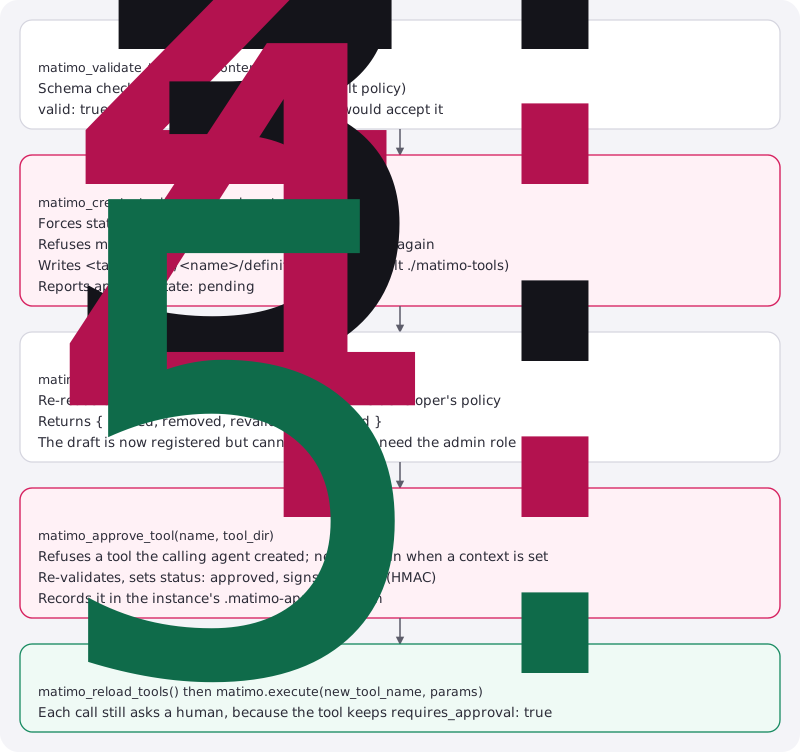
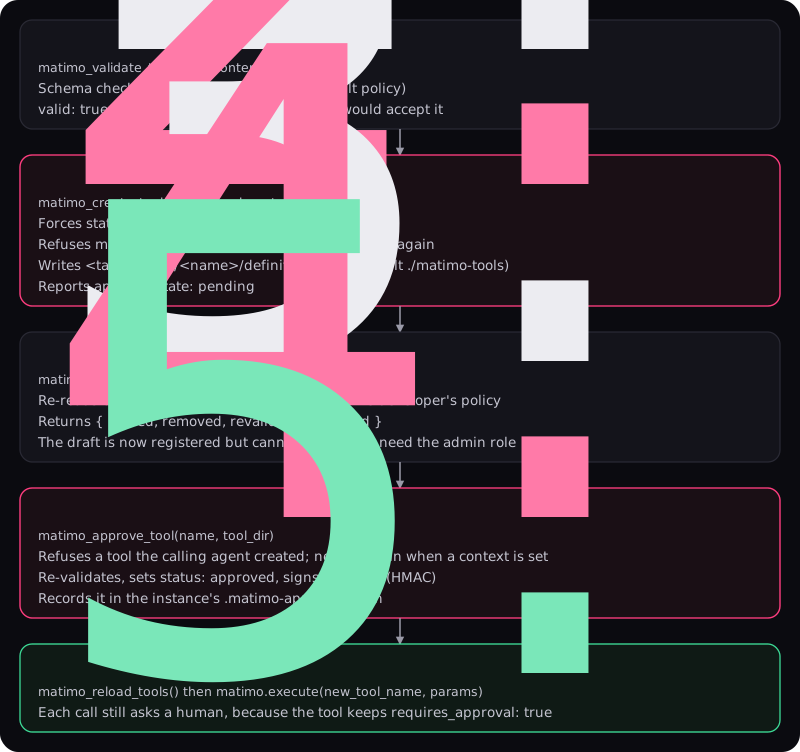
Data Flow
Section titled “Data Flow”Tool Execution Flow
Section titled “Tool Execution Flow”Every call takes the same path, whether it comes from the SDK, LangChain, CrewAI or MCP:
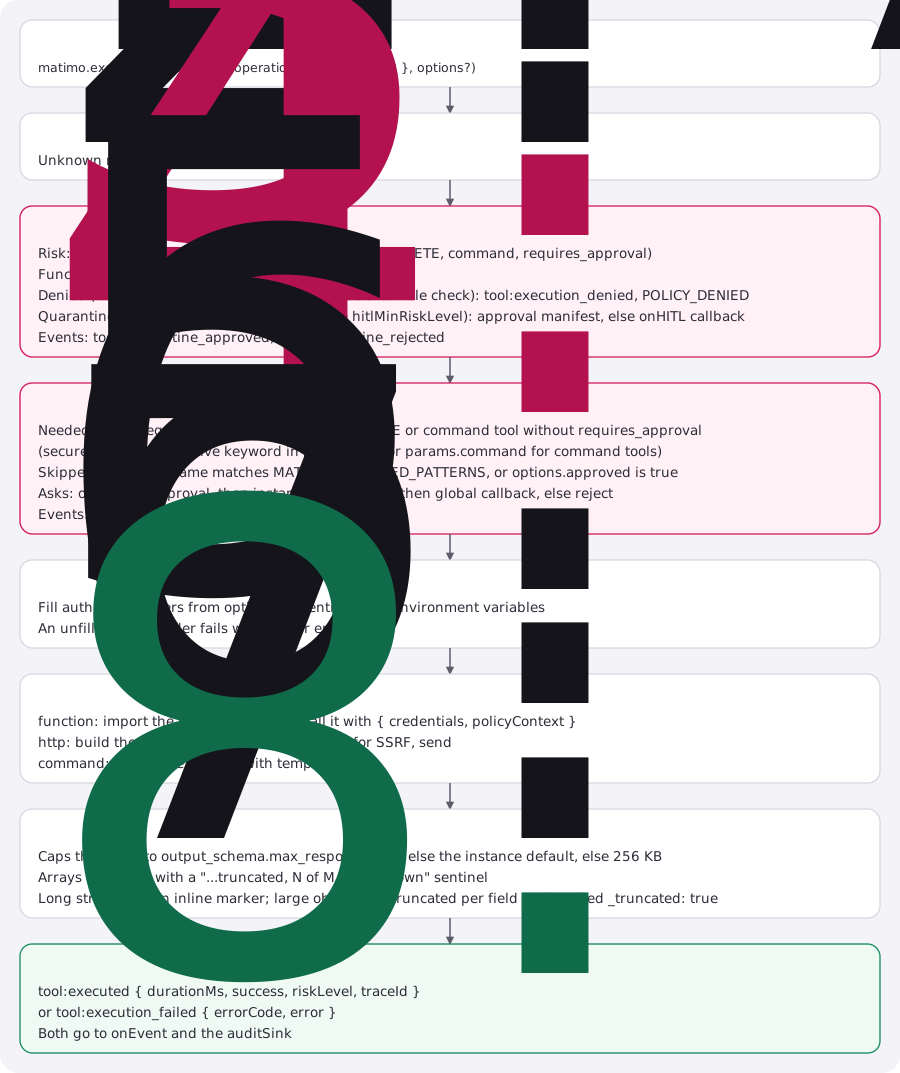
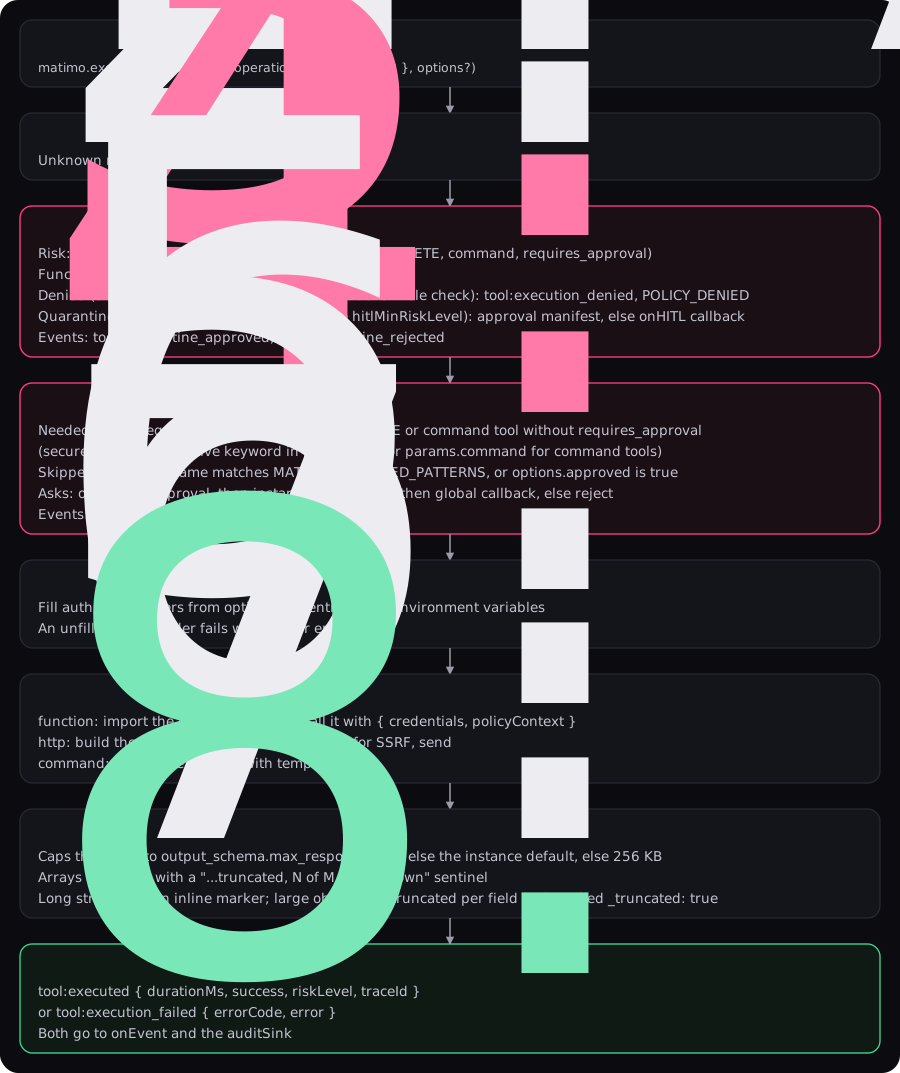
The calculator returns { result: 8 }. An HTTP tool returns { success, data, statusCode, headers } in TypeScript and the parsed body in Python.
OAuth2 Token Flow
Section titled “OAuth2 Token Flow”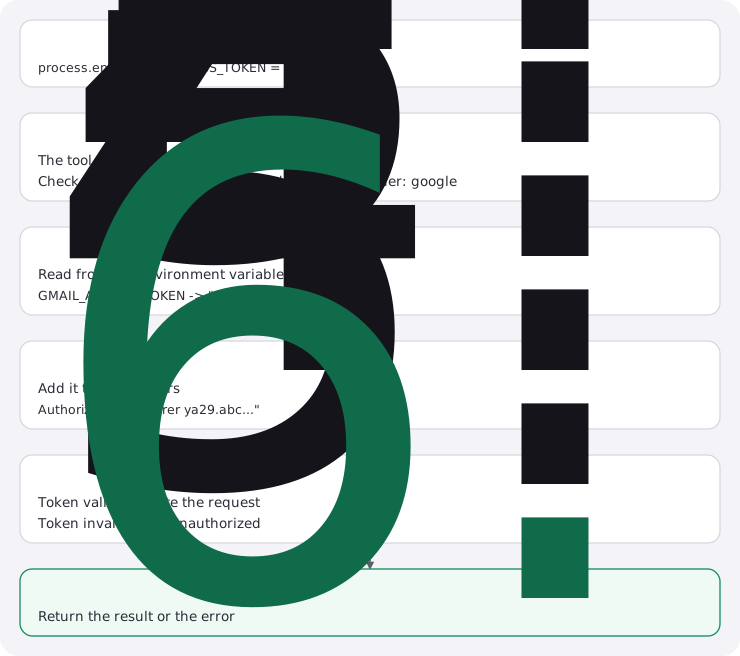

Framework Integration Patterns
Section titled “Framework Integration Patterns”Matimo supports 3 patterns for integrating with AI frameworks like LangChain, where the LLM automatically decides which tool to use:
Pattern 1: LangChain Official API (Recommended)
Section titled “Pattern 1: LangChain Official API (Recommended)”Uses LangChain’s official tool() function with automatic schema generation:
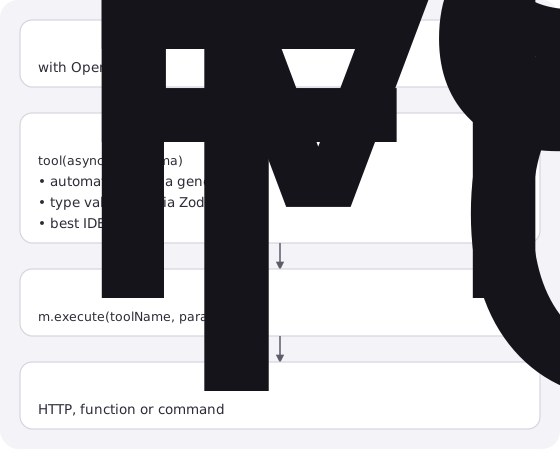
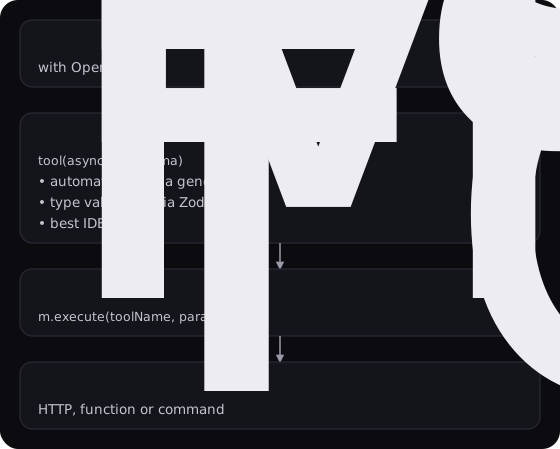
When to use: Default choice for AI agents with LangChain
Pattern 2: Decorator Pattern with LangChain
Section titled “Pattern 2: Decorator Pattern with LangChain”Uses Matimo’s @tool() decorators for class-based agents:
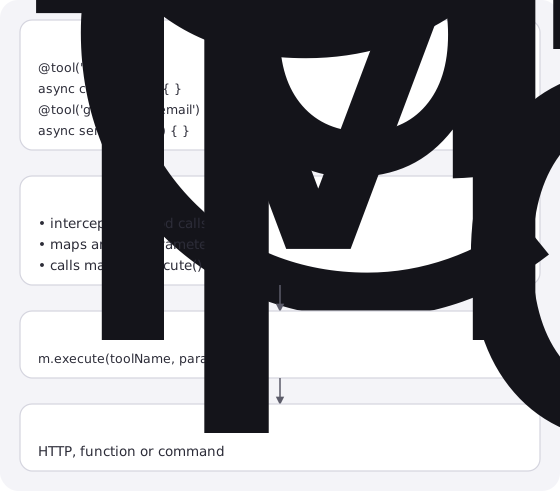
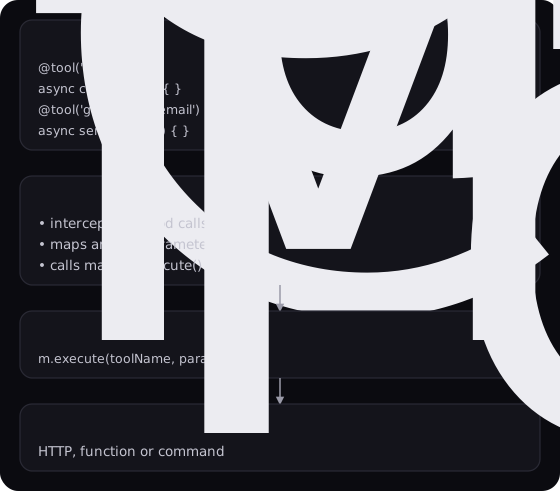
When to use: Class-based agents, automatic tool binding
Pattern 3: Factory Pattern with LangChain
Section titled “Pattern 3: Factory Pattern with LangChain”Direct matimo.execute() calls in agent logic:
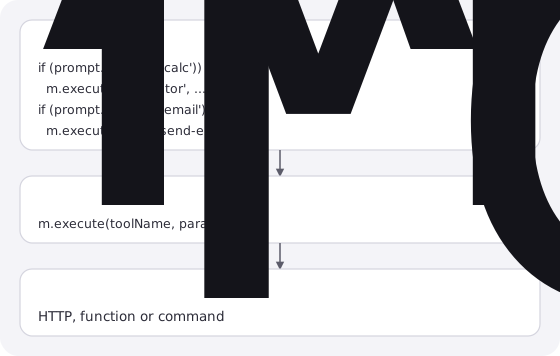
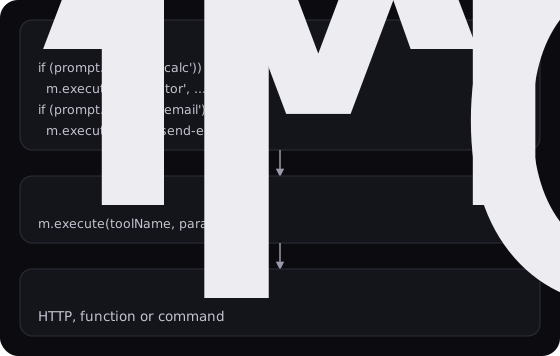
When to use: Simple logic, manual tool routing
Comparison Matrix
Section titled “Comparison Matrix”| Aspect | Official API | Decorator | Factory |
|---|---|---|---|
| LLM-Driven | Yes (automatic) | Yes | Manual |
| Schema Gen | Automatic | Manual | Manual |
| Type Safety | Excellent | Excellent | Good |
| Framework | LangChain+ | LangChain+ | Any |
| Best For | AI agents | Class-based agents | Simple logic |
| Learning Curve | Low | Medium | Low |
For full details, see Framework Integrations - LangChain.
Core Types
Section titled “Core Types”// Tool Definitioninterface ToolDefinition { name: string; description: string; version: string; parameters?: Record<string, Parameter>; execution: HttpExecution | CommandExecution | FunctionExecution; authentication?: AuthConfig; output_schema?: OutputSchema; tags?: string[]; // Governance requires_approval?: boolean; // ask a human on every call risk?: 'low' | 'medium' | 'high' | 'critical'; // can only raise the computed risk status?: 'draft' | 'approved' | 'deprecated'; // unset = approved}
// Execution Config (Function)interface FunctionExecution { type: 'function'; code: string; // path to the module, relative to the YAML timeout?: number;}
// Execution Config (Command)interface CommandExecution { type: 'command'; command: string; args?: string[]; cwd?: string; timeout?: number;}
// Execution Config (HTTP)interface HttpExecution { type: 'http'; method: 'GET' | 'POST' | 'PUT' | 'DELETE' | 'PATCH'; url: string; headers?: Record<string, string>; body?: unknown; query_params?: Record<string, string>;}
// Provider Definitioninterface ProviderDefinition { type: 'provider'; name: string; provider: { endpoints: OAuth2Endpoints; // ... };}In Python the same shapes are Pydantic models in matimo.core.models (ToolDefinition, Parameter, HttpExecution, CommandExecution, FunctionExecution, ProviderDefinition), validated when the YAML loads, as Zod does in TypeScript. They accept extra keys, such as notes:, which the TypeScript schema drops.
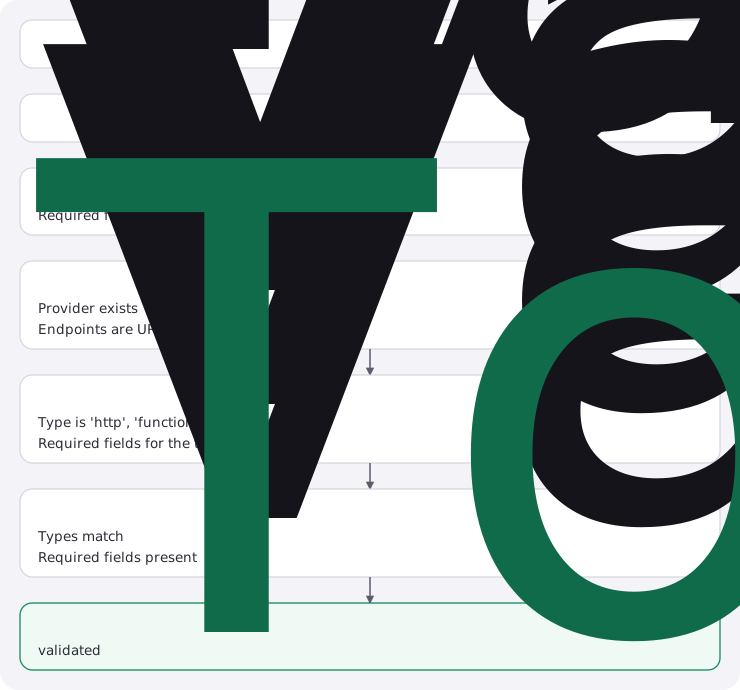
Validation Pipeline
Section titled “Validation Pipeline”Every tool goes through validation:

Error Handling
Section titled “Error Handling”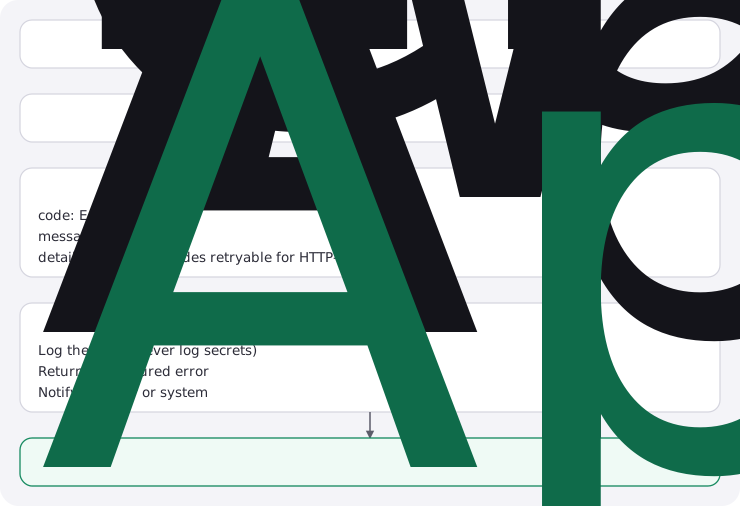
HTTP-sourced errors are mapped to specific codes rather than a single
generic failure, 401/403 → AUTH_FAILED, 429 → RATE_LIMIT_EXCEEDED,
other 4xx/5xx → EXECUTION_FAILED; a retryable flag on details
tells the caller whether the failure is worth retrying (true for 429
and 5xx). Network-level failures with no HTTP response at all (timeout,
DNS failure, connection refused) get their own TIMEOUT/NETWORK_ERROR
codes instead of being folded into EXECUTION_FAILED.
The MCP server surfaces this same structured data across the protocol
boundary: a failed tool call returns isError: true with a
structuredContent field carrying { code, statusCode, retryable, message }, rather than flattening the error into freeform text. See
MCP Server docs, Tool Metadata & Error Responses
for the exact shape and Error Codes Reference
for the full code list.
Design Principles
Section titled “Design Principles”1. Configuration-Driven
Section titled “1. Configuration-Driven”Tools defined in YAML, not code:
- Easy to update without redeploying
- Non-technical users can add tools
- Version control friendly
2. No Database
Section titled “2. No Database”Matimo needs no server or database. The only state it writes is the approval manifest (.matimo-approvals.json) and, if you configure one, the audit log:
- Easy to embed and scale
- Simple to test
3. Multi-Provider
Section titled “3. Multi-Provider”Support any OAuth2 provider:
- Google, GitHub, Slack out of box
- Add new providers with YAML
- No code changes needed
4. Type-Safe
Section titled “4. Type-Safe”Full TypeScript + Zod validation:
- Catch errors at load time
- IDE autocomplete support
- Zero
anytypes
5. Framework-Agnostic
Section titled “5. Framework-Agnostic”Works with any framework:
- Direct SDK usage
- LangChain (TypeScript and Python), CrewAI and Agno (Python)
- Any MCP client, through the MCP server
- Custom framework support
- Vercel AI, OpenAI and Anthropic SDK adapters
6. Secure by Default
Section titled “6. Secure by Default”Policy engine is on from the start:
- Every call is risk-classified and passes the execution gates
- DELETE and command tools ask a human unless they opt out (
governanceMode: 'legacy'restores the old default) - Untrusted command and function tools are blocked unless explicitly allowed
- Protected namespaces prevent shadowing built-in tools
- Agent-created tools must pass policy + content validation, and a human approves them
- Approved tools are HMAC-signed to prevent silent tampering
- Every call ends in an event;
JsonlFileSinkkeeps a hash-chained audit log
Extension Points
Section titled “Extension Points”Adding a New Tool
Section titled “Adding a New Tool”- Create
tools/category/tool-name/definition.yaml - Loader automatically discovers it
- Validation confirms correctness
- Ready to use
Adding an Executor
Section titled “Adding an Executor”There is no plug-in point for executors. A new execution type means a new execution.type in the Zod schema (core/schema.ts), an executor class in executors/, a case in MatimoInstance’s executor dispatch, and the same in the Python SDK.
Adding a Provider
Section titled “Adding a Provider”- Create
tools/provider-name/definition.yaml - Set
type: provider - Configure OAuth2 endpoints
- Tools reference provider in authentication
Performance Characteristics
Section titled “Performance Characteristics”| Operation | Time | Notes |
|---|---|---|
| Load tools | ~50ms | One-time, cached |
| Validate schema | ~5ms | Per tool |
| Execute command | Varies | Depends on command |
| Execute HTTP | 100-500ms | Network dependent |
| OAuth token inject | <1ms | Environment variable lookup |
Next Steps
Section titled “Next Steps”- SDK Usage Patterns: How to use Matimo
- Tool Specification: How to build tools
- Policy Engine & Lifecycle: Security controls and tool lifecycle
- Meta-Tools Reference: Built-in tool management
- Approval System: Who approves a call, and how
- Skills System: Domain knowledge via SKILL.md
- Logging: Winston logger integration
- Troubleshooting: Common issues