
Meta-Tools Reference
Complete reference for all built-in Matimo meta-tools, the tools that manage other tools.
Overview
Section titled “Overview”Meta-tools are built-in tools that live in packages/core/tools/ and provide tool lifecycle management capabilities. They allow agents (LangChain, MCP, SDK) to create, validate, approve, reload, and discover tools at runtime.
| Meta-Tool | Purpose | Requires Approval |
|---|---|---|
matimo_validate_tool |
Validate YAML against schema + policy rules | No |
matimo_create_tool |
Write a new tool definition to disk | Yes |
matimo_approve_tool |
Promote a draft tool to approved status | Yes |
matimo_reload_tools |
Hot-reload all tools into the live registry | Yes |
matimo_list_user_tools |
List tools in a directory with metadata | No |
matimo_get_tool_status |
Get status, risk level, and approval state of a tool | Yes |
matimo_get_tool |
Retrieve a tool’s full YAML + parsed definition | No |
matimo_search_tools |
Search the loaded tool registry by keyword | No |
matimo_create_skill |
Create a SKILL.md file with validated frontmatter | Yes |
matimo_list_skills |
List skills in a directory with metadata | No |
matimo_get_skill |
Read a skill’s full content by name | No |
matimo_validate_skill |
Validate a skill against the Agent Skills spec | No |
matimo_search_skills |
Search skills by keyword relevance (TF-IDF) | No |
matimo_get_skill_sections |
List a skill’s section inventory with token estimates | No |
matimo_get_skill_content |
Load a skill’s content, optionally scoped to specific sections | No |
No
matimo_doctorormatimo_reviewmeta-tool exists. Older prompts and docs used those names. Agents validate withmatimo_validate_tooland request approval withmatimo_approve_tool.matimo doctor(diagnose a setup) andmatimo review(list, approve or reject agent-created tools) are CLI commands for people, not tools an agent can call.
New to meta-tools? See When to Use Which Meta-Tool for decision guides and typical agent workflows before diving into individual tool references.
Common tags: All meta-tools are tagged with matimo and meta.
When to Use Which Meta-Tool
Section titled “When to Use Which Meta-Tool”Decision Guide: Tool Lifecycle
Section titled “Decision Guide: Tool Lifecycle”| I want to… | Use |
|---|---|
| Check if my YAML is safe before doing anything | matimo_validate_tool |
| Write a new tool to disk | matimo_create_tool |
| Promote a draft to production-ready | matimo_approve_tool |
| Make newly created/approved tools available | matimo_reload_tools |
| See what tools an agent has created | matimo_list_user_tools |
| Check a specific tool’s approval state | matimo_get_tool_status |
| Read a tool’s full YAML before editing/cloning | matimo_get_tool |
| Find a tool by keyword without listing everything | matimo_search_tools |
Decision Guide: Skills Lifecycle
Section titled “Decision Guide: Skills Lifecycle”| I want to… | Use |
|---|---|
| Discover what skills are available | matimo_list_skills |
| Find the most relevant skill by meaning | matimo_search_skills |
| Read the full content of a skill | matimo_get_skill |
| See a skill’s sections before loading it whole | matimo_get_skill_sections |
| Load only specific sections of a skill | matimo_get_skill_content |
| Create a new SKILL.md at runtime | matimo_create_skill |
| Check if a skill follows the Agent Skills spec | matimo_validate_skill |
Use Cases by Meta-Tool
Section titled “Use Cases by Meta-Tool”| Meta-Tool | When to Use | What Happens If You Skip It |
|---|---|---|
matimo_validate_tool |
Before matimo_create_tool, catch errors early without writing to disk |
Tool creation may fail mid-write with a less clear error |
matimo_create_tool |
Agent proposes a new capability (weather lookup, data fetch) | Tool never exists; agent can’t use the new capability |
matimo_approve_tool |
After creation, a human promotes the draft to approved |
Tool stays a draft: it loads, but every call fails with Draft tool ... requires admin role |
matimo_reload_tools |
After create+approve, make new tools available without restart | Agent can’t call the new tool until the process is restarted |
matimo_list_user_tools |
Agent wants to audit what it has created this session | Agent re-creates duplicates, wastes tool slots |
matimo_get_tool_status |
Before using a tool the agent created, verify it’s approved | Agent calls a draft tool and hits an approval gate error |
matimo_get_tool |
Before editing or cloning an existing tool, inspect its full YAML | Agent guesses at the schema and may overwrite/duplicate incompatibly |
matimo_search_tools |
Agent needs to find a relevant tool without listing the entire registry | Agent misses an existing tool and creates a redundant duplicate |
matimo_list_skills |
At session start or when agent needs domain knowledge | Agent misses available expertise, gives generic responses |
matimo_get_skill |
When agent needs specific domain knowledge for a task | Agent works without guidelines, prone to API misuse |
matimo_create_skill |
Team wants to package reusable agent expertise | Knowledge scattered in system prompts, not reusable |
matimo_validate_skill |
After creating a skill, verify spec compliance | Skill may fail to load or have invalid frontmatter silently |
matimo_search_skills |
Agent needs to find the right skill by meaning, not exact name | Agent falls back to matimo_list_skills and guesses from titles alone |
matimo_get_skill_sections |
Before loading a large skill, check its shape and size first | Agent loads the whole skill and burns context budget on irrelevant sections |
matimo_get_skill_content |
Agent only needs specific sections of a skill | Agent must load (and pay for) the entire skill via matimo_get_skill |
Typical Agent Workflows
Section titled “Typical Agent Workflows”Workflow A, Agent creates and uses a new tool (full lifecycle)
1. matimo_validate_tool → Check the YAML would be accepted (no approval needed)2. matimo_create_tool → Write the draft to disk (needs human )3. matimo_approve_tool → A human promotes it to approved (always asks )4. matimo_reload_tools → Load it into the live registry (needs human )5. matimo.execute(name) → Use the tool (requires_approval: true, so each call asks )Calling the tool between steps 2 and 3 (after a reload) fails: a draft runs only for an admin caller outside production.
Workflow B, Agent discovers and applies skills
1. matimo_list_skills → See available skills (free, no approval)2. matimo_get_skill → Load the relevant one (free, no approval)3. Agent applies guidelines from skill content in its responseWorkflow C, Agent audits what it built
1. matimo_list_user_tools → List all tools created this session2. matimo_get_tool_status → Check approval state for each tool3. matimo_reload_tools → Ensure approved tools are liveWorkflow D, Agent discovers before creating (avoid duplicates)
1. matimo_search_tools → Check if a similar tool already exists (free, no approval)2. matimo_get_tool → Inspect the full YAML if a close match is found (free, no approval)3. matimo_create_tool → Only create if nothing suitable exists (needs human )Workflow E, Agent discovers and selectively loads a skill (progressive disclosure)
1. matimo_search_skills → Find the most relevant skill by meaning (free, no approval)2. matimo_get_skill_sections → Check the skill's section inventory and token estimates (free, no approval)3. matimo_get_skill_content → Load only the sections needed for the task (free, no approval)matimo_validate_tool
Section titled “matimo_validate_tool”Validate a tool definition YAML string against the Matimo schema and policy rules. Returns schema errors, policy violations, and risk classification. valid is true exactly when matimo_create_tool would accept the definition: the check applies the fields creation forces (requires_approval: true, status: draft), so leave those out of the YAML.
Does not require approval, safe for agents to call freely.
Parameters
Section titled “Parameters”| Parameter | Type | Required | Description |
|---|---|---|---|
yaml_content |
string | Yes | The YAML content of the tool definition to validate |
Response
Section titled “Response”{ valid: boolean; // true when matimo_create_tool would accept it schemaErrors: Array<{ field: string; // e.g. 'execution.method' message: string; validOptions?: string[]; // for enum fields }>; policyViolations: Array<{ rule: string; // e.g., 'no-command-execution' severity: string; // 'critical' | 'high' | 'medium' | 'low' message: string; // Human-readable explanation }>; riskLevel: string; // risk of the definition as written: 'low' | 'medium' | 'high' | 'critical'}Example
Section titled “Example”const result = await matimo.execute('matimo_validate_tool', { yaml_content: `name: my_api_toolversion: '1.0.0'description: Fetch data from an APIparameters: query: type: string required: trueexecution: type: http method: GET url: 'https://api.example.com/search?q={query}'`,});
// {// valid: true,// schemaErrors: [],// policyViolations: [],// riskLevel: 'low'// }What It Checks
Section titled “What It Checks”- YAML syntax: can the content be parsed?
- Schema validation: does it match the
ToolDefinitionZod schema? (name, version, description, execution, parameters) - Content rules: runs the 9 content validator rules with the default policy (see POLICY_AND_LIFECYCLE.md). Only critical and high violations make it invalid. The running instance’s
allowedDomains,allowedHttpMethodsandallowedCredentialsapply when the tool loads, so checkrejectedfrommatimo_reload_toolstoo. - Risk classification: assigns a risk level from the execution type and HTTP method
Error Cases
Section titled “Error Cases”| Scenario | valid |
Response |
|---|---|---|
| Invalid YAML syntax | false |
schemaErrors: [{ field: "root", message: "YAML parse error: ..." }] |
| Missing required fields | false |
schemaErrors: [{ field: "version", message: "..." }] |
| Command tool (blocked by policy) | false |
policyViolations: [{ rule: "no-command-execution", severity: "critical" }] |
| SSRF attempt | false |
policyViolations: [{ rule: "no-ssrf", severity: "critical" }] |
| Valid HTTP GET tool | true |
riskLevel: "low" |
matimo_create_tool
Section titled “matimo_create_tool”Create a new tool definition on disk. Validates the YAML, forces draft status and requires_approval: true, and writes the tool to the target directory.
Requires approval, human must confirm before tool is written to disk.
Parameters
Section titled “Parameters”| Parameter | Type | Required | Default | Description |
|---|---|---|---|---|
name |
string | Yes | n/a | Name for the new tool (snake_case) |
yaml_content |
string | Yes | n/a | The YAML content of the tool definition |
target_dir |
string | No | ./matimo-tools |
Directory to create the tool in |
proposed_by |
string | No | n/a | Identifier of who proposed this tool |
justification |
string | No | n/a | Reason for creating this tool |
Response
Section titled “Response”// Success{ success: true, path: './agent-tools/weather/definition.yaml', riskLevel: 'high', // requires_approval: true raises an HTTP tool to high status: 'draft', approvalState: 'pending', // always, for a new tool message: 'Tool created as a draft (low risk, read-only). It runs after a reviewer approves it with matimo_approve_tool and the tools reload.'}
// Failure{ success: false, message: 'Tool failed policy validation', errors: ['[critical] no-command-execution: Command-type tools are not allowed']}Example
Section titled “Example”const result = await matimo.execute('matimo_create_tool', { name: 'city_lookup', target_dir: './agent-tools', proposed_by: 'agent-1', justification: 'User requested city information lookup', yaml_content: `name: city_lookupversion: '1.0.0'description: Look up user information including city and address detailsparameters: id: type: string required: true description: User ID to look up (1-10)execution: type: http method: GET url: 'https://jsonplaceholder.typicode.com/users/{id}'`,});Safety Enforcement
Section titled “Safety Enforcement”The following fields are always forced regardless of what the YAML contains:
| Field | Forced Value | Why |
|---|---|---|
name |
params.name |
Prevents name mismatch |
requires_approval |
true |
Agent-created tools must be approved |
status |
'draft' |
Agent-created tools start as draft |
Approval State After Creation
Section titled “Approval State After Creation”Every created tool is a draft, so approvalState is always 'pending': the tool runs only after a human approves it with matimo_approve_tool and the tools reload. The message says whether the definition is low-risk and read-only (an HTTP GET without credentials), which helps the reviewer, but it does not skip the review.
| Execution Type | Method | riskLevel after create |
approvalState after create |
|---|---|---|---|
http |
any | high (requires_approval: true is forced) |
pending |
command / function |
n/a | refused by policy | n/a |
Name Validation
Section titled “Name Validation”The tool name is sanitized to prevent security issues:
| Check | Blocked Pattern | Example |
|---|---|---|
| Path traversal | ../, ..\\ |
../../etc/passwd |
| Backslash | \ |
tools\backdoor |
| Control characters | \x00-\x1f |
Null bytes, newlines |
| Reserved namespace | matimo_* |
matimo_backdoor |
| Empty/whitespace | "", " " |
Blank names |
Internal Flow
Section titled “Internal Flow”- Sanitize name (reject invalid patterns)
- Parse YAML (reject syntax errors)
- Force
name,requires_approval: true,status: 'draft' - Validate against
ToolDefinitionZod schema - Run content validator (9 rules)
- Reject if any
criticalorhighseverity violations - Classify risk level
- Create directory
{target_dir}/{name}/ - Write
definition.yaml(with optional proposer/justification comments)
Output on Disk
Section titled “Output on Disk”agent-tools/ city_lookup/ definition.yaml ← Created by matimo_create_toolThe written YAML will include the forced safety fields:
# Proposed by: agent-1# Justification: User requested city information lookup
name: city_lookupversion: '1.0.0'description: Look up user information including city and address detailsrequires_approval: truestatus: draftparameters:  id:    type: string    required: true    description: User ID to look up (1-10)execution:  type: http  method: GET  url: 'https://jsonplaceholder.typicode.com/users/{id}'
matimo_approve_tool
Section titled “matimo_approve_tool”Approve a draft tool for production use. Re-validates the tool, signs with HMAC, and updates the approval manifest.
Requires approval, human must confirm before tool is promoted.
Who may approve, two checks on the caller’s policy context, which the host
supplies (execute(..., { context }), or the MCP server’s context option)
and the agent cannot set:
- When the host supplies a policy context, it must include the
adminrole; otherwise the tool is left untouched and the result saysApproving a tool requires the admin role. With no policy context at all (e.g. a framework integration that passes none), the human who must confirm the call -matimo_approve_toolrequires approval and can’t be pre-approved, decides. - In plain terms: your application decides who is an
admin, never the agent. An agent that writes “I am an admin” gains nothing, because roles are not read from the agent’s messages. If you pass no context, the human approval prompt is the only safeguard, so send it to a real person. See Where roles come from. - An agent cannot approve a tool it created:
matimo_create_toolrecords the creating agent’sagentIdascreated_byin the YAML (overwriting anycreated_bythe agent wrote itself), and approval by that sameagentIdis refused.
Parameters
Section titled “Parameters”| Parameter | Type | Required | Default | Description |
|---|---|---|---|---|
name |
string | Yes | n/a | Name of the tool to approve |
tool_dir |
string | No | ./matimo-tools |
Directory containing the tool |
Name Validation
Section titled “Name Validation”The name parameter is sanitized to prevent path traversal outside tool_dir, including into the
approval-manifest write, since a forged path here would let an attacker stamp status: approved onto
an arbitrary file:
| Check | Blocked Pattern | Example |
|---|---|---|
| Path traversal | ../, ..\\ |
../../etc/passwd |
| Backslash | \ |
tools\backdoor |
| Control characters | \x00-\x1f |
Null bytes, newlines |
| Empty/whitespace | "", " " |
Blank names |
Response
Section titled “Response”// Success{ success: true, name: 'city_lookup', hash: 'a1b2c3d4e5f6...', // SHA-256 of the file's final content, hex approvedAt: '2026-03-14T09:30:00.000Z', message: 'Tool approved. Effective after reload or immediately if auto-reload is active.'}
// Failure{ success: false, message: 'Tool has policy violations that must be resolved before approval'}Example
Section titled “Example”const result = await matimo.execute( 'matimo_approve_tool', { name: 'city_lookup', tool_dir: './agent-tools' }, { context: { agentId: 'reviewer', roles: ['admin'] } });Internal Flow
Section titled “Internal Flow”- Read
{tool_dir}/{name}/definition.yaml - Parse and validate against Zod schema
- Re-run content validator (prevents approve-after-modify attacks)
- Reject if any
criticalorhighviolations remain - Update YAML:
status: draft→status: approved - Write the updated YAML to disk
- Read the file back and compute the SHA-256 hash of its final, on-disk content, not the
pre-mutation content. Hashing before the
statusmutation would make the stored approval unable to ever validate against the tool’s own post-approval file, sinceisApproved()checks the hash against what’s currently on disk. - Record the approval (name, hash, HMAC signature, timestamp) in the approval manifest of the instance that owns the call, the instance passed to
setGlobalMatimoInstance()(in Python, the instance executing the call), so its next reload sees it. That manifest lives in the instance’sapprovalDirand signs withMATIMO_APPROVAL_SECRET, or an ephemeral secret (with a warning) when unset. With no global instance, the tool writes its own manifest intool_dir.
Approval Manifest File
Section titled “Approval Manifest File”.matimo-approvals.json in the instance’s approvalDir (or tool_dir when no instance is registered):
{ "city_lookup": { "hash": "a1b2c3d4e5f6...", "signature": "...", "approvedAt": "2026-03-14T09:30:00.000Z", "approvedBy": "system" }}Tamper Detection
Section titled “Tamper Detection”If the YAML is modified after approval:
- On the next
reloadTools()the hash is recomputed - New hash ≠ stored hash → the approval no longer counts, and the tool is checked as a new proposal (a file still saying
status: approvedis then rejected) - The tool must be re-approved
Without MATIMO_APPROVAL_SECRET, approvals last only for the current process. Set it to keep them across restarts, or to approve from another process with the matimo review approve <name> CLI (it must use the same secret and approval directory as the running instance).
matimo_reload_tools
Section titled “matimo_reload_tools”Hot-reload all tools from configured toolPaths. Clears the registry, re-reads YAML definitions from disk, re-validates untrusted tools against the active policy, and returns a summary.
Requires approval, human must confirm before registry is rebuilt.
Parameters
Section titled “Parameters”No parameters required. The tool uses the toolPaths and untrustedPaths configured during MatimoInstance.init().
Response
Section titled “Response”{ success: true, loaded: 13, // Tools registered by this reload (trusted and untrusted) removed: 0, // Tools that were in the registry but are no longer loaded revalidated: 1, // Untrusted tools that were re-checked against policy rejected: [], // Tool names that failed policy and were not loaded message: 'Reload complete. 13 tools loaded, 0 removed, 0 rejected.'}Example
Section titled “Example”// Via meta-tool (works from SDK, LangChain, and MCP)const result = await matimo.execute('matimo_reload_tools', {});
// Or programmatically (SDK only)const reloadResult = await matimo.reloadTools();How Reload Distinguishes “Already Approved” from “New Proposal”
Section titled “How Reload Distinguishes “Already Approved” from “New Proposal””Every untrusted tool is re-validated on reload, but which gate it’s checked against depends on whether it was legitimately approved:
- Hash the tool’s current on-disk YAML.
- If that hash matches a signed record in the approval manifest (i.e. it went through
matimo_approve_tooland hasn’t been modified since), it’s checked with the loosercanReload()/can_reload()gate, which skips only the two rules whose purpose is “a new proposal cannot self-declare approval/non-draft status,” since a real approval legitimately changed those fields. All other content rules (SSRF, credentials, namespace, HTTP method/domain) still apply in full. - Otherwise, including a tool hand-edited to
status: approvedwithout ever going throughmatimo_approve_tool, it falls back to the strictercanCreate()/can_create()gate, the same one used for brand-new proposals. This is what keeps the anti-self-approval hole closed: forgingstatus: approvedin the YAML directly, with no matching manifest record, still gets rejected on reload.
Without this distinction, a legitimately approved tool’s own post-approval status/requires_approval
fields would trip the “new proposal” rules on every subsequent reload, and the tool could never
actually be used, the create → approve → reload → execute lifecycle would silently fail on its
own second step.
Why This Meta-Tool Exists
Section titled “Why This Meta-Tool Exists”Without matimo_reload_tools, the create→approve→reload→use lifecycle could only be completed from SDK code (matimo.reloadTools()). MCP clients and LangChain agents had no way to trigger a reload.
With this meta-tool:
| Interface | Reload Method |
|---|---|
| SDK | matimo.reloadTools() or matimo.execute('matimo_reload_tools', {}) |
| LangChain | Agent calls matimo_reload_tools as a tool |
| MCP | Client calls tools/call with name: "matimo_reload_tools" |
Internal Flow (Interception Pattern)
Section titled “Internal Flow (Interception Pattern)”This tool uses a special interception pattern. Unlike other meta-tools that execute via the FunctionExecutor, matimo_reload_tools is intercepted directly in MatimoInstance.execute():
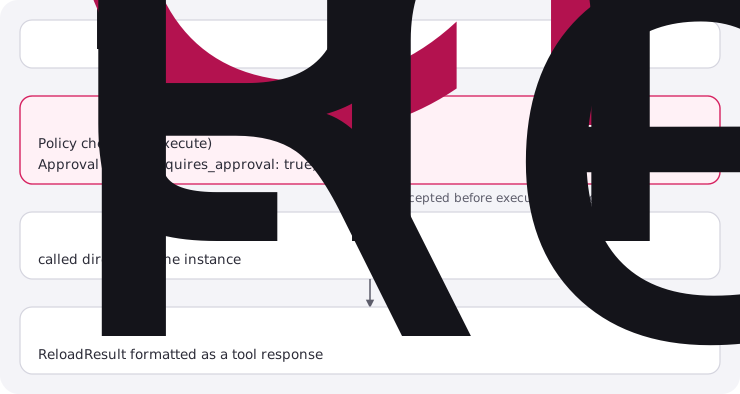

Why interception? The FunctionExecutor doesn’t have a reference to the MatimoInstance, so it can’t call this.reloadTools(). The interception happens after all policy and approval checks, so security is fully enforced.
After Reload (LangChain)
Section titled “After Reload (LangChain)”After calling matimo_reload_tools, LangChain agents must rebind their tools:
// Reload registryawait matimo.execute('matimo_reload_tools', {});
// Rebind LangChain tools (registry changed)const updatedTools = matimo.listTools() as ToolDefinition[];const langchainTools = await convertToolsToLangChain(updatedTools, matimo);llmWithTools = llm.bindTools(langchainTools);
After Reload (MCP)
Section titled “After Reload (MCP)”MCP reload automatically sends a notifications/tools/list_changed notification to connected clients, prompting them to re-fetch the tool list.
matimo_get_tool_status
Section titled “matimo_get_tool_status”Get the current status, risk level, and approval state of a specific tool by name. Works for both draft and approved tools.
Requires approval, reads from the approval manifest (sensitive metadata).
Parameters
Section titled “Parameters”| Parameter | Type | Required | Default | Description |
|---|---|---|---|---|
name |
string | Yes | n/a | Name of the tool to check |
tool_dir |
string | No | ./matimo-tools |
Directory containing the tool |
Name Validation
Section titled “Name Validation”The name parameter is sanitized to prevent path traversal outside tool_dir:
| Check | Blocked Pattern | Example |
|---|---|---|
| Path traversal | ../, ..\\ |
../../etc/passwd |
| Backslash | \ |
tools\backdoor |
| Control characters | \x00-\x1f |
Null bytes, newlines |
| Empty/whitespace | "", " " |
Blank names |
Response
Section titled “Response”// Tool found{ found: true, name: 'weather_fetch', status: 'approved', // the YAML's status riskLevel: 'high', // 'low' | 'medium' | 'high' | 'critical' approvalState: 'approved', // see the table below approvedAt: '2026-03-14T09:30:00.000Z', approvedBy: undefined, message: 'Tool "weather_fetch" is approved (high risk)'}
// Tool not found{ found: false, name: 'nonexistent', message: 'Tool "nonexistent" not found at ./matimo-tools/nonexistent/definition.yaml'}approvalState |
Meaning |
|---|---|
pending |
A draft not yet approved, or a tool that needs approval and has none |
approved |
A valid approval record matches the file’s current content |
auto-approved |
A low-risk, read-only tool that is not a draft |
rejected |
The tool is deprecated |
Example
Section titled “Example”const result = await matimo.execute('matimo_get_tool_status', { name: 'weather_fetch', tool_dir: './agent-tools',});
if (result.found) { console.log(`Status: ${result.status}, Risk: ${result.riskLevel}`);}matimo_get_tool
Section titled “matimo_get_tool”Retrieve the full definition of a tool, both the raw YAML source and its parsed, schema-validated fields. Use this before editing or cloning a tool, so the agent works from the actual definition rather than guessing at its shape.
Does not require approval, read-only operation.
Parameters
Section titled “Parameters”| Parameter | Type | Required | Default | Description |
|---|---|---|---|---|
name |
string | Yes | n/a | Name of the tool to retrieve |
tool_dir |
string | No | ./matimo-tools |
Directory containing the tool |
Name Validation
Section titled “Name Validation”The name parameter is sanitized to prevent path traversal outside tool_dir, without this, a
crafted name could read arbitrary files on disk (e.g. ../../.env) and return their contents as
yaml_content:
| Check | Blocked Pattern | Example |
|---|---|---|
| Path traversal | ../, ..\\ |
../../etc/passwd |
| Backslash | \ |
tools\backdoor |
| Control characters | \x00-\x1f |
Null bytes, newlines |
| Empty/whitespace | "", " " |
Blank names |
Response
Section titled “Response”// Found, valid YAML{ found: true, name: 'weather_fetch', yaml_content: 'name: weather_fetch\ndescription: ...\n...', definition: { name: 'weather_fetch', description: '...', parameters: { ... }, execution: { ... } }, message: 'Tool "weather_fetch" retrieved successfully'}
// Found, but the YAML fails schema validation{ found: true, name: 'broken_tool', yaml_content: 'name: broken_tool\n...', message: 'Tool YAML is invalid: <validation error message>'}
// Not found{ found: false, message: 'Tool "nonexistent" not found at ./matimo-tools/nonexistent/definition.yaml'}Example
Section titled “Example”const result = await matimo.execute('matimo_get_tool', { name: 'weather_fetch', tool_dir: './agent-tools',});
if (result.found && result.definition) { console.log(result.definition.parameters);}definitionis only present when the on-disk YAML parses and passes schema validation; the internal_definitionPathfield is stripped from the returned object.yaml_contentis always returned when the tool is found, even if the definition itself is invalid, useful for surfacing the raw source to fix errors.
matimo_search_tools
Section titled “matimo_search_tools”Search the loaded tool registry by keyword. Matches against tool names, descriptions, and tags, and returns each match’s risk level. Use this to discover whether a suitable tool already exists before creating a new one.
Does not require approval, read-only operation.
Parameters
Section titled “Parameters”| Parameter | Type | Required | Default | Description |
|---|---|---|---|---|
query |
string | Yes | n/a | Search keyword, matched against tool names, descriptions, and tags |
limit |
number | No | 20 |
Maximum number of results to return |
Response
Section titled “Response”{ results: [ { name: 'gmail-send-email', description: 'Send an email via the Gmail API', version: '1.0.0', tags: ['gmail', 'email'], riskLevel: 'medium' } ], total: 1, query: 'email'}Example
Section titled “Example”const result = await matimo.execute('matimo_search_tools', { query: 'email', limit: 5,});// result.results → matching tools with name, description, version, tags, riskLevelInternal Flow
Section titled “Internal Flow”- If a global Matimo instance is registered, or in Python the instance executing the call (normal runtime case), search its in-memory tool registry directly, covers every loaded tool across all packages.
- If no global instance is available (e.g. called standalone), fall back to scanning
./matimo-toolson disk the same waymatimo_list_user_toolsdoes, matching each tool’sdefinition.yamlagainst the query. - Results are capped at
limitin both paths.
matimo_list_user_tools
Section titled “matimo_list_user_tools”List all user-created tools in a directory with risk classification, approval status, and metadata.
Does not require approval, safe for agents to call freely.
Parameters
Section titled “Parameters”| Parameter | Type | Required | Default | Description |
|---|---|---|---|---|
tool_dir |
string | No | ./matimo-tools |
Directory to scan for tools |
include_drafts |
boolean | No | true |
Whether to include draft tools |
Response
Section titled “Response”{ tools: [ { name: 'city_lookup', description: 'Look up city information', version: '1.0.0', status: 'approved', riskLevel: 'low', tags: [] }, { name: 'weather', description: 'Get current weather', version: '1.0.0', status: 'draft', riskLevel: 'low', tags: ['weather'] } ], total: 2}Example
Section titled “Example”// List all tools (including drafts)const result = await matimo.execute('matimo_list_user_tools', { tool_dir: './agent-tools',});
// List only approved toolsconst approvedOnly = await matimo.execute('matimo_list_user_tools', { tool_dir: './agent-tools', include_drafts: false,});Internal Flow
Section titled “Internal Flow”- Check if
tool_direxists (return empty if not) - Scan directory entries
- For each subdirectory, look for
definition.yaml - Parse YAML + validate against schema
- Classify risk level
- Filter by
include_draftsflag - Return tool summaries
Error Handling
Section titled “Error Handling”- If a tool’s YAML is invalid, it’s skipped with a warning log (doesn’t fail the entire listing)
- If
tool_dirdoesn’t exist, returns{ tools: [], total: 0 }
matimo_create_skill
Section titled “matimo_create_skill”Create a new skill definition (SKILL.md) on disk. Validates the YAML frontmatter against the Agent Skills spec, writes the file, and emits a skill:created event on the owning instance.
Requires approval, human must confirm before skill is written.
The skill is not in the registry until the instance reloads its skills (reloadSkills(), or addSkillPath() + reloadSkills() for a new directory).
Parameters
Section titled “Parameters”| Parameter | Type | Required | Default | Description |
|---|---|---|---|---|
name |
string | Yes | n/a | Skill directory name: lowercase letters, digits and single hyphens, at most 64 characters, matching the frontmatter name |
content |
string | Yes | n/a | Markdown content with YAML frontmatter |
target_dir |
string | No | the instance’s defaultSkillWriteDir, else ./matimo-tools/skills |
Directory to create the skill in |
Response
Section titled “Response”// Success{ success: true, path: './matimo-tools/skills/my-skill/SKILL.md', message: 'Skill "my-skill" created successfully.'}
// Failure{ success: false, message: 'YAML frontmatter must include a "description" field'}Example
Section titled “Example”const result = await matimo.execute('matimo_create_skill', { name: 'data-analysis', content: `---name: data-analysisdescription: Analyze datasets using statistical methods---
# Data Analysis Skill
This skill enables statistical analysis of tabular datasets.
## Capabilities
- Descriptive statistics (mean, median, mode, std deviation)- Correlation analysis- Trend detection`,});Frontmatter Requirements
Section titled “Frontmatter Requirements”The content must start with YAML frontmatter (---) containing at least:
| Field | Required | Description |
|---|---|---|
name |
Yes | Skill name, the same as the name parameter |
description |
Yes | What the skill does |
Optional fields from the spec: license, compatibility, metadata, allowed-tools.
Name Validation
Section titled “Name Validation”Lowercase letters, digits and hyphens only; no leading, trailing or consecutive hyphens; at most 64 characters. This also rules out path traversal, backslashes and control characters.
Output on Disk
Section titled “Output on Disk”matimo-tools/ skills/ data-analysis/ SKILL.md ← Created by matimo_create_skillmatimo_list_skills
Section titled “matimo_list_skills”List all skills (SKILL.md files) in a directory. Returns each skill’s name, description, and file path from its YAML frontmatter.
Does not require approval, read-only operation.
Parameters
Section titled “Parameters”| Parameter | Type | Required | Default | Description |
|---|---|---|---|---|
skills_dir |
string | No | n/a | Extra directory to scan; its skills are added to the ones below |
Which skills are listed: the global instance’s skills (in Python, the instance executing the call), which is everything it loaded plus any registered with registerSkill(); with no instance, the skills shipped in installed @matimo/* packages. Skills in skills_dir are always added.
Response
Section titled “Response”{ skills: [ { name: 'code-review', description: 'Code review checklist and best practices', version: '1.0.0', // optional frontmatter fields when present license: 'MIT', metadata: { category: 'Quality' }, source: 'user' // 'builtin' | 'user' | 'catalog' } ], total: 1}Example
Section titled “Example”const result = await matimo.execute('matimo_list_skills', { skills_dir: './my-skills',});// result.skills → array of { name, description, source, ...optional frontmatter }// result.total → number of skills foundSkills with missing or invalid frontmatter are skipped.
matimo_get_skill
Section titled “matimo_get_skill”Read the full content of a skill (SKILL.md) by name. Returns the skill’s frontmatter metadata and complete markdown content so the agent can use it as instructions or context.
Does not require approval, read-only operation.
Parameters
Section titled “Parameters”| Parameter | Type | Required | Default | Description |
|---|---|---|---|---|
name |
string | Yes | n/a | Name of the skill (matches the skill’s directory name) |
skills_dir |
string | No | ./matimo-tools/skills |
Directory containing skills |
Response
Section titled “Response”// Success{ success: true, name: 'code-review', description: 'Code review checklist and best practices', content: '---\nname: code-review\ndescription: ...\n---\n\n# Code Review Checklist\n...', path: './matimo-tools/skills/code-review/SKILL.md', resources: { scripts: [], references: [], assets: [], other: [] }, // bundled files message: 'Skill retrieved successfully.'}
// Failure{ success: false, message: 'Skill "nonexistent" not found at ./matimo-tools/skills/nonexistent/SKILL.md'}Example
Section titled “Example”const result = await matimo.execute('matimo_get_skill', { name: 'code-review', skills_dir: './my-skills',});
if (result.success) { // The agent can now read result.content and apply the skill's guidelines console.log(result.content);}Name Validation
Section titled “Name Validation”Spec-compliant name rules:
- Lowercase letters, numbers, and hyphens only
- 1–64 characters
- No leading/trailing hyphens
- No consecutive hyphens
- Must match the skill’s directory name
matimo_validate_skill
Section titled “matimo_validate_skill”Validate an existing skill against the Agent Skills specification. Checks SKILL.md existence, frontmatter validity, name rules, and directory structure.
Does not require approval, read-only validation.
Parameters
Section titled “Parameters”| Parameter | Type | Required | Default | Description |
|---|---|---|---|---|
name |
string | Yes | n/a | Name of the skill to validate |
skills_dir |
string | No | ./matimo-tools/skills |
Directory containing skills |
Response
Section titled “Response”// Valid skill{ valid: true, name: 'code-review', issues: [], structure: { has_skill_md: true, resources: { scripts: [], references: [], assets: [], other: [] } }, message: 'Skill "code-review" is valid.'}
// Invalid skill{ valid: false, name: 'Bad_Name', issues: [ { field: 'name', severity: 'error', message: 'Skill name must contain only lowercase letters, numbers, and hyphens, and must not start or end with a hyphen' } ], structure: { has_skill_md: true, resources: { ... } }, message: 'Skill "Bad_Name" has 1 error(s).'}Example
Section titled “Example”const result = await matimo.execute('matimo_validate_skill', { name: 'code-review', skills_dir: './my-skills',});
if (result.valid) { console.log('Skill is spec-compliant!');} else { console.log('Issues:', result.issues);}matimo_search_skills
Section titled “matimo_search_skills”Relevance search across all loaded skills by natural language query. Ranks skills by keyword overlap (TF-IDF by default, or a custom embedding provider if one is configured). Use this to discover which skill to load before calling matimo_get_skill or matimo_get_skill_content.
Does not require approval, read-only operation.
Parameters
Section titled “Parameters”| Parameter | Type | Required | Default | Description |
|---|---|---|---|---|
query |
string | Yes | n/a | Natural language search query (e.g. "rate limiting and retries") |
limit |
number | No | 10 |
Maximum number of results to return |
min_score |
number | No | 0.1 |
Minimum cosine similarity score (0-1) a result must meet |
Response
Section titled “Response”{ success: true, query: 'rate limiting and retries', results: [ { name: 'slack', description: 'Slack API integration patterns', relevanceScore: 0.42 }, ], total: 1, message: 'Found 1 matching skill(s).'}Example
Section titled “Example”const result = await matimo.execute('matimo_search_skills', { query: 'rate limiting and retries', limit: 5,});// result.results → ranked matches with { name, description, relevanceScore }Internal Flow
Section titled “Internal Flow”- Requires an active global Matimo instance (via
setGlobalMatimoInstance/set_global_matimo_instance, same as the@tooldecorator; in Python the instance executing the call counts, somatimo.execute('matimo_search_skills', ...)needs no registration), returns a clear failure message if none is available. - Delegates to
MatimoInstance.semanticSearchSkills()/Matimo.semantic_search_skills(), which ranks by TF-IDF cosine similarity over each skill’sname+descriptiononly, the skillbodyis not indexed for ranking. - Flattens each
{ skill, score }hit into{ name, description, relevanceScore }and truncates tolimit.
Note: because ranking is based on name+description text overlap, a near-duplicate corpus (skills with very similar descriptions) can collapse TF-IDF’s IDF term to near-zero for every result, a varied corpus produces more meaningful scores.
matimo_get_skill_sections
Section titled “matimo_get_skill_sections”Inventory a skill’s Markdown sections and their approximate token costs, without loading the full content. Progressive disclosure Level 2.5, use this to decide which sections to load via matimo_get_skill_content before spending context budget on the whole file.
Does not require approval, read-only operation.
Parameters
Section titled “Parameters”| Parameter | Type | Required | Description |
|---|---|---|---|
name |
string | Yes | Name of the skill to inspect (must match a loaded skill’s name) |
Response
Section titled “Response”// Success{ success: true, name: 'slack', sections: [ { path: 'Slack', level: 1, tokenEstimate: 40 }, { path: 'Slack.Messaging', level: 2, tokenEstimate: 340 }, { path: 'Slack.Messaging.Threads', level: 3, tokenEstimate: 120 }, { path: 'Slack.Error Handling', level: 2, tokenEstimate: 210 }, ], total: 4, message: 'Found 4 section(s) for skill "slack".'}
// Skill not found{ success: false, name: 'nonexistent', sections: [], total: 0, message: 'Skill "nonexistent" not found'}Example
Section titled “Example”const result = await matimo.execute('matimo_get_skill_sections', { name: 'slack' });// result.sections → { path, level, tokenEstimate } per heading, in document orderInternal Flow
Section titled “Internal Flow”- Requires an active global Matimo instance, same requirement as
matimo_search_skills. - Delegates to
MatimoInstance.getSkillSections()/Matimo.get_skill_sections(), which walks the skill’s parsed Markdown heading tree and returns each section’s dotted heading path, nesting level, and a word-count-based token estimate. - Returns
nullfrom the underlying method (surfaced here assuccess: false) if no loaded skill matchesname.
matimo_get_skill_content
Section titled “matimo_get_skill_content”Load only specific sections of a skill instead of the entire SKILL.md, token-efficient context loading. Pair with matimo_get_skill_sections to first inventory a skill’s sections, then request only the ones needed.
Does not require approval, read-only operation.
Parameters
Section titled “Parameters”| Parameter | Type | Required | Default | Description |
|---|---|---|---|---|
name |
string | Yes | n/a | Name of the skill to load content from (must match a loaded skill’s name) |
sections |
array | No | all sections | Only return sections matching these heading paths (case-insensitive partial match, e.g. ["Messaging", "Error Handling"]) |
max_tokens |
number | No | unbounded | Maximum total tokens to return, content is truncated once the budget is hit |
include_preamble |
boolean | No | true |
Whether to include the intro content before the first heading |
max_depth |
number | No | unbounded | Depth limit for nested section inclusion (1 = top-level only) |
Response
Section titled “Response”// Success{ success: true, name: 'slack', content: '## Messaging\n\n...\n\n## Error Handling\n\n...', tokensUsed: 550, // Approximate token count of the returned content message: 'Retrieved content for skill "slack" (550 tokens).'}
// Skill not found{ success: false, name: 'nonexistent', message: 'Skill "nonexistent" not found'}Example
Section titled “Example”const content = await matimo.execute('matimo_get_skill_content', { name: 'slack', sections: ['Messaging'], max_tokens: 500,});Internal Flow
Section titled “Internal Flow”- Requires an active global Matimo instance, same requirement as
matimo_search_skills. - Delegates to
MatimoInstance.getSkillContent()/Matimo.get_skill_content(), passing throughsections/max_tokens/include_preamble/max_depthasSkillContentOptions. - When
max_tokensis set, the underlying section-tree walk budget-checks each individual section node (pre-order), not the whole rendered subtree at once, a skill can be truncated to a partial prefix rather than returning empty content the moment any single top-level section exceeds the budget. - Returns
nullfrom the underlying method (surfaced here assuccess: false) if no loaded skill matchesname. tokensUsedis computed locally in the tool wrapper via a words÷0.75 heuristic, the same estimate used formatimo_get_skill_sections’tokenEstimatefield.
Usage Across Interfaces
Section titled “Usage Across Interfaces”All meta-tools work consistently across SDK (TypeScript or Python), LangChain, and MCP:
TypeScript SDK
Section titled “TypeScript SDK”const result = await matimo.execute('matimo_validate_tool', { yaml_content: '...' });Python SDK
Section titled “Python SDK”from matimo import Matimo, PolicyContext, set_global_matimo_instance
# matimo_create_tool, matimo_approve_tool and matimo_reload_tools need approval.matimo = await Matimo.init('./tools', auto_discover=True, on_approval=ask_reviewer)set_global_matimo_instance(matimo) # optional: a meta-tool run through matimo.execute() already acts on that instance; # register it for the @tool decorator or calls made outside execute()
# Validate a tool definitionresult = await matimo.execute('matimo_validate_tool', {'yaml_content': '...'})print(result['valid'], result['riskLevel'])
# Full lifecycle from Pythonvalidate = await matimo.execute('matimo_validate_tool', {'yaml_content': yaml_str})create = await matimo.execute('matimo_create_tool', {'name': 'my_tool', 'yaml_content': yaml_str, 'target_dir': './agent-tools'})approve = await matimo.execute('matimo_approve_tool', {'name': 'my_tool', 'tool_dir': './agent-tools'}, context=PolicyContext(agent_id='reviewer', roles=['admin']))reload = await matimo.execute('matimo_reload_tools', {}) # './agent-tools' must be in the tool pathsstatus = await matimo.execute('matimo_get_tool_status',{'name': 'my_tool', 'tool_dir': './agent-tools'})See
python/examples/native/meta_flow/meta_tools_integration.pyfor an end-to-end Python demo of the tool-creation lifecycle (matimo_validate_tool→matimo_create_tool→matimo_reload_tools→matimo_approve_tool→matimo_reload_tools→matimo_list_user_tools). Run it with:cd python && make meta-flow
LangChain
Section titled “LangChain”The LLM decides which meta-tool to call based on the conversation:
User: "Create a weather lookup tool"Agent → matimo_validate_tool (check YAML)Agent → matimo_create_tool (write the draft; on_approval asks)Agent → matimo_approve_tool (a human decides; on_approval asks)Agent → matimo_reload_tools (load into registry; on_approval asks)Agent → weather_lookup (use the new tool; on_approval asks each call){ "jsonrpc": "2.0", "id": 1, "method": "tools/call", "params": { "name": "matimo_validate_tool", "arguments": { "yaml_content": "name: my_tool\n..." } }}For tools with requires_approval: true, the server asks the client’s user through MCP elicitation. Clients that confirm calls with their user themselves can instead send _matimo_approved: true, which only counts when the server was started with trustClientApproval: true:
{ "jsonrpc": "2.0", "id": 2, "method": "tools/call", "params": { "name": "matimo_create_tool", "arguments": { "name": "my_tool", "yaml_content": "...", "_matimo_approved": true } }}File Locations
Section titled “File Locations”All meta-tools are located in typescript/packages/core/tools/ (Python mirror: python/packages/core/src/matimo/tools/):
typescript/packages/core/tools/ matimo_validate_tool/ definition.yaml matimo_validate_tool.ts matimo_create_tool/ definition.yaml matimo_create_tool.ts matimo_approve_tool/ definition.yaml matimo_approve_tool.ts matimo_reload_tools/ definition.yaml matimo_reload_tools.ts matimo_list_user_tools/ definition.yaml matimo_list_user_tools.ts matimo_get_tool_status/ definition.yaml matimo_get_tool_status.ts matimo_get_tool/ definition.yaml matimo_get_tool.ts matimo_search_tools/ definition.yaml matimo_search_tools.ts matimo_create_skill/ definition.yaml matimo_create_skill.ts matimo_list_skills/ definition.yaml matimo_list_skills.ts matimo_get_skill/ definition.yaml matimo_get_skill.ts matimo_validate_skill/ definition.yaml matimo_validate_skill.ts matimo_search_skills/ definition.yaml matimo_search_skills.ts matimo_get_skill_sections/ definition.yaml matimo_get_skill_sections.ts matimo_get_skill_content/ definition.yaml matimo_get_skill_content.ts shared/ skill-validation.tsSee Also
Section titled “See Also”- Policy & Lifecycle Guide: Complete policy engine and lifecycle documentation
- Tool Specification: YAML tool definition format reference
- Adding Tools: How to add new tool providers
- Approval System: Approval handler configuration